


• Unified API
  • Mobile SDK
  • Connection Widget
  • Streaming
  • Lab Reports API
  • Graph API
  • Health Scores
  • Health Rewards
  • Planned Workouts
  • Predictions
  • Lab Testing
  • AI Interface
  • Enterprise
  • Insurance
  • Integrations
  • Research
  • Podcast
  • Blog
  • Reports
  • Events
  • Documentation
  • Community
  • Example apps
  • Wearable Data
  • About
  • Customers
  • Partners
  • Careers
  • Support
  • Pricing
Terra
Pricing
Become an integrationGet started
next ventures
pioneer fund
samsung next
y combinator
general catalyst

The world's best health apps run on Terra data

Get started
ProductsIntegrationsAI InterfaceAuthenticationMobile DevelopmentDocumentationGraphAPIPredictions
DocumentationAPISDKQuickstartExample Apps
CommunityBlogResearchCommunityPodcastAuthorsGithub
CompanyAboutCareersCustomersBecome an IntegrationCookies PolicyGDPRPrivacy PolicyTerms of Purchase
© Terra API. 2026 — All rights reserved.

Cookie Preferences

Essential CookiesAlways On
Advertisement Cookies
Analytics Cookies

Crunch Time: Embrace the Cookie Monster Within!

We use cookies to enhance your browsing experience and analyse our traffic. By clicking “Accept All”, you consent to our use of cookies according to our Cookie Policy. You can change your mind any time by visiting out cookie policy.

Cookies Policy
All articles

In this article:

  • 01What you can stream
  • 02How the data moves
  • 03What a WebSocket dispatch message looks like
  • 04Staying connected
  • 05When to stream
  • 06Pricing
  • 07Building it: Terra Real-Time SDK plus WebSocket
  • 08The short version
All articles

Product Updates

How Terra Real-Time Streaming Works, and What It Costs

We often get asked how real-time streaming works and what it costs. Here's everything explained in one place, including pricing and example payloads.


Halvard Ramstad
Halvard Ramstad

16 September 2026

How Terra Real-Time Streaming Works, and What It Costs

Most health data arrives after the fact. For example a run ends, the watch syncs, a webhook lands with the finished workout. The same flow applies for sleep, steps, HRV, and training load.

This posts outlines how real-time streaming works with Terra API. RT Streaming sends each reading to your backend as the device produces it (near real-time). 

We cover how the data moves, what messages look like, and what it costs.

What you can stream

Live metrics from Bluetooth heart-rate straps, smartwatches, and phone sensors. Depending on the device: heart rate, steps, distance, speed, step cadence, floors climbed, accelerometer, gyroscope, and location where supported.

Examples include: Garmin, Apple, Suunto, Polar, Wahoo, Strava, Zwift, and many more. 

The device decides what you get. A chest strap gives you heart rate and nothing else. A watch or a phone can give you several streams at once. 

Streaming doesn't replace the standard API. Completed workouts, sleep, daily summaries, and history still come through the Unified API. Most products use both: streaming for the live screen, the standard API for everything after.

Get the latest Terra Research reports and insights every week as soon as they're published.

By continuing, I agree to the Privacy Policy and Terms of Service.

How the data moves

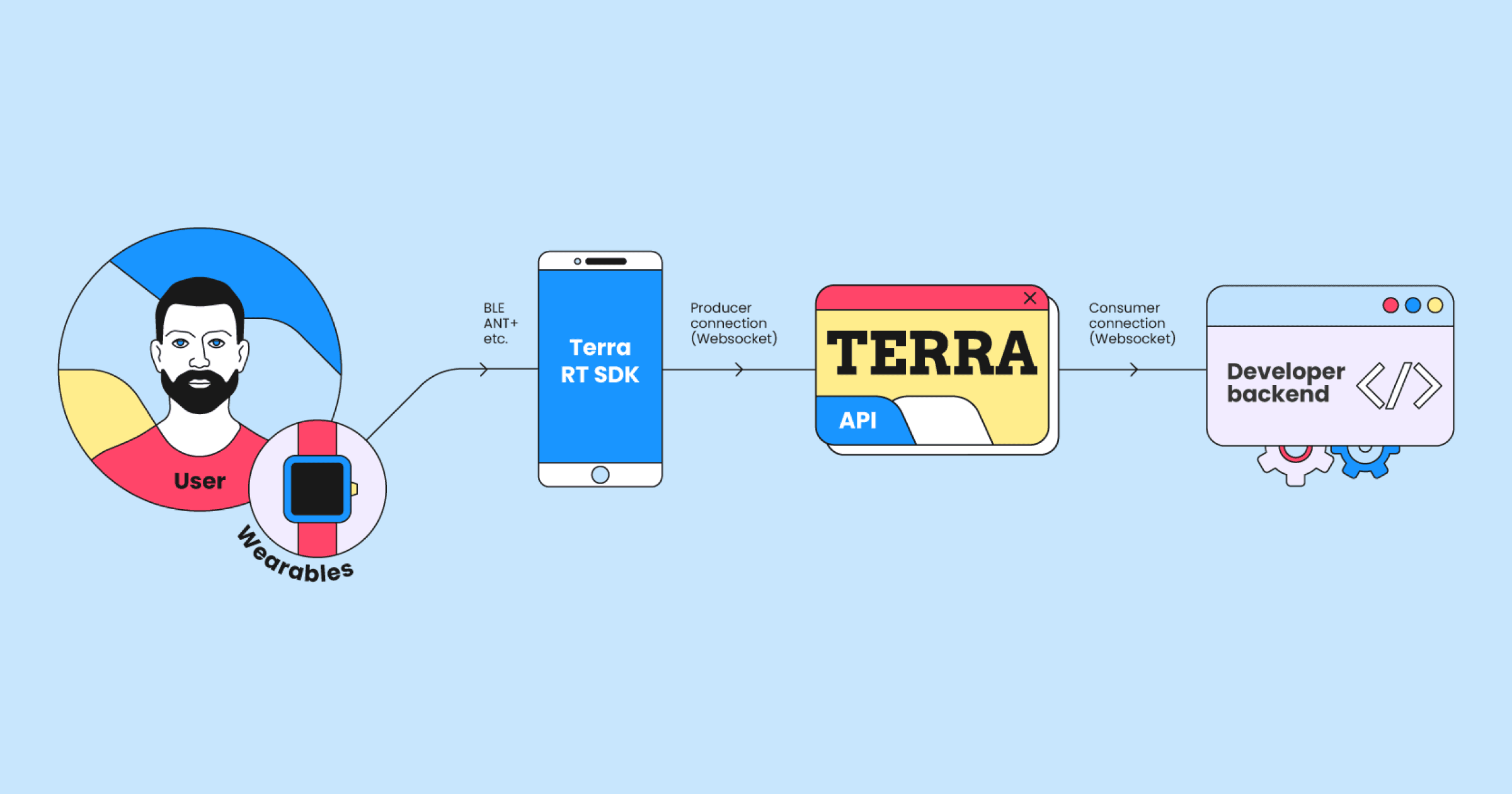
Four parts.

streaming-flowchart.png

The athlete wears a strap, a watch, or a phone acting as a sensor. Your app, with the Terra RT SDK in it, connects to that device over BLE, ANT+, or a supported watch integration, and forwards the readings to Terra over a producer connection. Your backend opens one WebSocket consumer connection to Terra and receives everything.

The phone does the hard part, which is talking to hardware. Terra does the other hard part, which is getting the data to you reliably and in one format no matter what produced it. Your backend speaks one protocol and never thinks about Bluetooth.

What a WebSocket dispatch message looks like

Say the athlete is wearing a Polar H10 chest strap. Your app reads it over BLE and forwards each reading to Terra. Every reading then arrives at your backend as a WebSocket DISPATCH message, exactly like this:

{
  "op": 5,
  "d": {
    "ts": "2022-05-04T10:26:11.268507+01:00",
    "val": 95
  },
  "uid": "user_id_here",
  "seq": 73,
  "t": "HEART_RATE"
}
  • t is the data type, here HEART_RATE.
  • d.ts is when the reading happened.
  • d.val is the value, 95 BPM.
  • uid is the Terra user ID of the athlete.
  • seq is a cursor. It orders messages and lets you recover the ones you missed. It's sparse, so gaps between values are normal and don't mean you lost data.

That's the whole format. Other data types use the same envelope. Single-value types like steps or calories put their number in d.val. Multi-axis types put an array in d.d instead: [x, y, z] for accelerometer and gyroscope, [lat, lng] for location.

One thing to notice. If the athlete is wearing a watch that sends both heart rate and location, those come through as two separate DISPATCH messages with two separate sequence numbers, not one bundled message. Remember that when we get to pricing.

Staying connected

Your backend holds one WebSocket. Three things to get right.

Heartbeats. When the socket opens, Terra tells you the heartbeat interval. Send one within that interval or the connection drops.

Tokens. Auth is a short-lived, single-use developer token. Mint a new one for every connection. Don't cache them, don't reuse them.

Replay. Store the seq of the last message you processed. If the socket drops, reconnect, wait for the first live message, and ask Terra to replay everything between your stored cursor and that one. A network blip during a race becomes a gap you fill in, not data you lost. This is the step people skip when prototyping and regret in production.

When to stream

One question: does the data lose its value if it arrives after the activity ends? If yes, stream. If no, don't.

Yes: live race tracking, event dashboards, a coach watching a group's heart rates mid-session, threshold alerts, training or rehab products that react to the data as it comes in, research protocols collecting raw sensor data.

No: anything about a finished workout, sleep, recovery, or a daily summary. Streaming would be a bad way to get those, and the standard API is already good at it.

Pricing

Streaming is a $99/month add-on to any Terra plan, and it includes 20,000 streaming credits a month. Credits reset each cycle.

Each athlete who streams during the month uses 1,000 credits. That covers their first 16,000 messages, which is just under 4.5 hours at one reading a second. Past that, each extra message is 1/16 of a credit. The allowance is per athlete, so one athlete's unused messages don't cover another's.

In practice: a 4-hour race streaming heart rate is 1,000 credits per athlete. The same race streaming heart rate and location is 1,800, because that's two messages a second, not one. Duration is cheap. Metrics multiply.

Beyond the 20,000 included credits, extra credits are $0.005 each, dropping to $0.003 past 1,000,000 in a month. Streams keep running when you go over. You're billed for the extra at the end of the cycle.

What a marathon costs (example)

200 tracked runners, heart rate and location once a second, average finish 4:30. Each runner works out to about 2,025 credits, or roughly $10. For the whole field, the month's bill is $2,024, including the $99 add-on, with the 20,000 included credits taking $100 off the top. About $10 a runner for live heart rate and a live position on the map for the full race.

To estimate your own: count athletes, hours per athlete, and messages a second. One for a single metric, two for heart rate plus GPS, unless your device testing says otherwise. Apply the 16,000-message allowance to each athlete, add 1,000 credits each, and price anything past 20,000 at $0.005.

Building it: Terra Real-Time SDK plus WebSocket

  1. Add the Terra RT SDK to your iOS or Android app.
  2. Generate an SDK auth token from your backend.
  3. Connect the athlete's wearable or phone/watch sensor.
  4. Generate a producer token and start streaming from the app.
  5. Generate a developer token and open the WebSocket from your backend.
  6. Handle DISPATCH messages.
  7. Persist the latest seq so you can replay after a disconnect.
  8. Test with Terra's synthetic streaming users first, then real devices.

The short version

  • Streaming delivers device readings while the activity is happening, via the RT SDK in your app and a WebSocket in your backend.
  • $99/month, 20,000 credits included. Enough for 20 athletes at just under 4.5 hours each.
  • Each active athlete is 1,000 credits, with 16,000 messages included before overage starts.
  • Duration is cheap. Metrics multiply. HR + GPS is two messages, not one.
  • Price on measured cadence, not assumptions.
Previous
Next

Continue reading

  • Use synthetic data to rapidly prototype health products

    Synthetic users let you put your product through its paces with every health scenario, from marathoners to light sleepers, without waiting for those exact users to show up.

    18 September 2026

  • Terra now delivers per-set strength training data

    Terra now delivers strength workouts set by set: reps, weight, effort and rest, normalized across nine integrations including watch-sensed Garmin sets.

    8 September 2026

  • Garmin's Connect Developer Program is paused: what it means if you're building on wearable data

    Garmin paused new Connect Developer Program applications while it updates the program. What the pause covers, why Garmin data matters, how to keep shipping.

    7 September 2026