We use cookies to enhance your browsing experience and analyse our traffic. By clicking “Accept All”, you consent to our use of cookies according to our Cookie Policy. You can change your mind any time by visiting out cookie policy.
The complete guide: How the new Google Health API works
Google Health API replaces the Fitbit Web API. This is the field guide with code, schemas, and a migration playbook to help you understand where Google Health is heading.
A field guide to the new Google Health API, written after our team has tested it.
Last month Google retired the Fitbit Web API and shipped something called the Google Health API in its place. Architecturally, our team has found that the replacement is cleaner than the legacy Fitbit APIs. We've spent the past week running probes against every data type and comparing notes against the rest of the wearable API landscape we live inside. What follows is the field guide that will help you understand how Google Health's new API works and what you can build on top of it. Because the API is still evolving ahead of GA, some schemas, scopes, naming conventions, and quota behavior may continue to change.
Get the latest Terra Research reports and insights every week as soon as they're published.
The Google Health API is the new Google REST API that replaces the Fitbit Web API.
So far, it exposes 31 data types via four read methods (list, reconcile, rollUp, dailyRollUp) under one uniform resource shape.
The Fitbit Web API sunsets in September 2026 and existing OAuth tokens do not transfer. This means every user must reconsent again through Google OAuth.
We observed significantly higher-frequency intraday heart rate data than what most developers are used to from the legacy Fitbit APIs.
Fitbit Web API to Google Health API: migration timeline
Google is sunsetting the Fitbit Web API in September 2026. The replacement, the Google Health API, is live now at health.googleapis.com/v4/. Existing OAuth tokens do not automatically carry over to the new APIs, so users will likely need to reconnect during migration. For teams already integrated with Fitbit today, the next few months are likely the practical migration window to transition existing integrations.
Google Health API architecture: one endpoint, 31 data types, four read methods
The old Fitbit Web API was a museum of REST decisions made between 2013 and 2024. Each data domain, for example Sleep vs Heart rate had its own URL grammar, its own pagination convention and its own date format.
The Google Health API has exactly one shape:
GET https://health.googleapis.com/v4/users/me/dataTypes/{type}/dataPoints
Plus four read methods that compose with it: list (raw points), reconcile (merged across sources), rollUp (aggregated over physical time windows), dailyRollUp (aggregated over civil time windows). That's the surface area: Thirty one data types, four methods, one URL template.
Notice what's in there: every data point carries its provenance, meaning the platform that produced it, the device model and how it was recorded. The old Fitbit response gave you a number and a timestamp and you had to trust it came from a Fitbit. In the new world, a single user's data stream can include points from a Pixel Watch, a Fitbit Sense, and a third-party device, and the API tells you which is which on every reading.
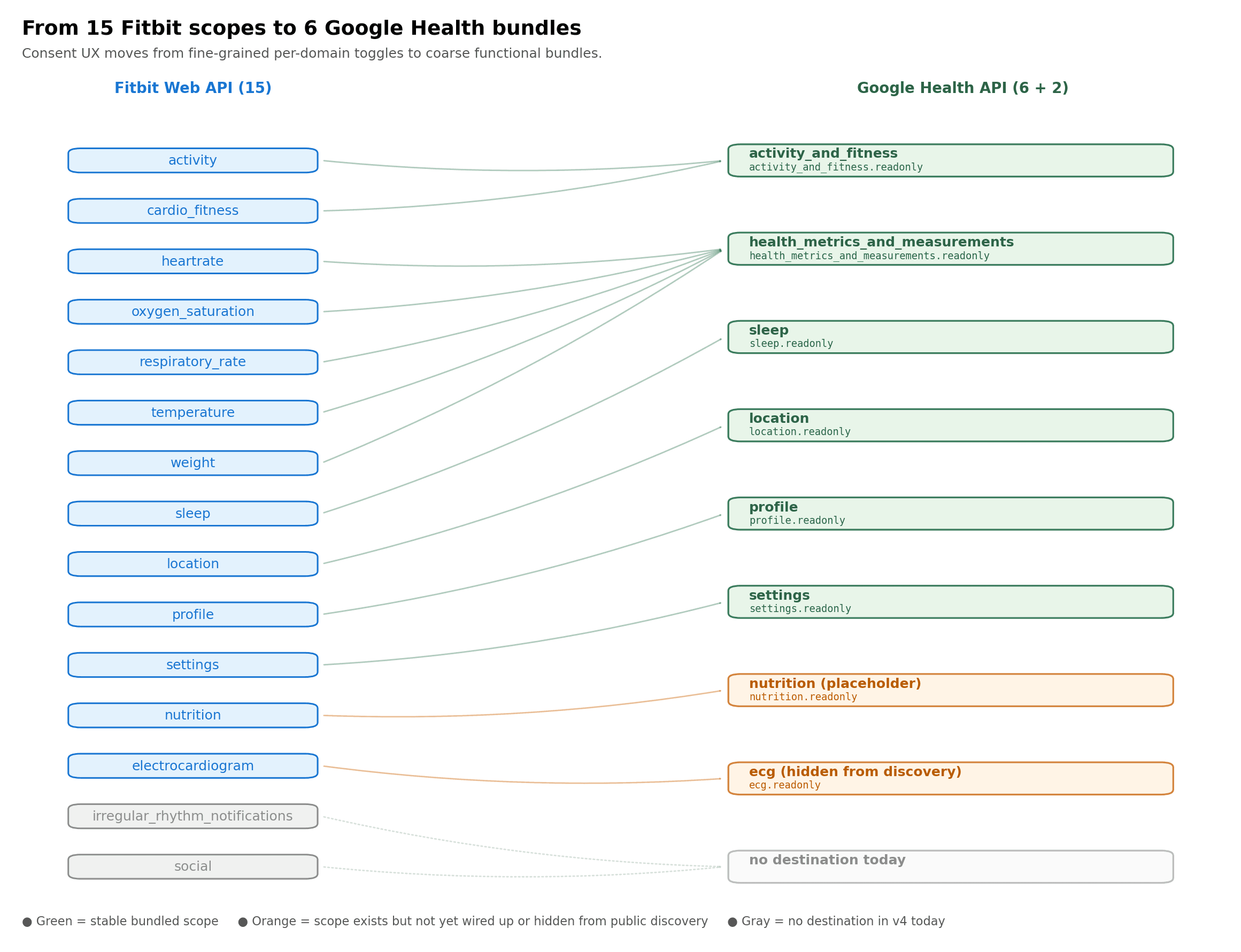
Beyond the URL shape, the OAuth surface itself collapsed. Fifteen Fitbit scopes map down to six functional bundles, with some scope groupings appear to be designed for future expansion.
Figure 1. Fitbit's per-domain scope toggles consolidate into coarse functional bundles in Google Health.
Google Health API intraday heart rate: 5-second resolution by default
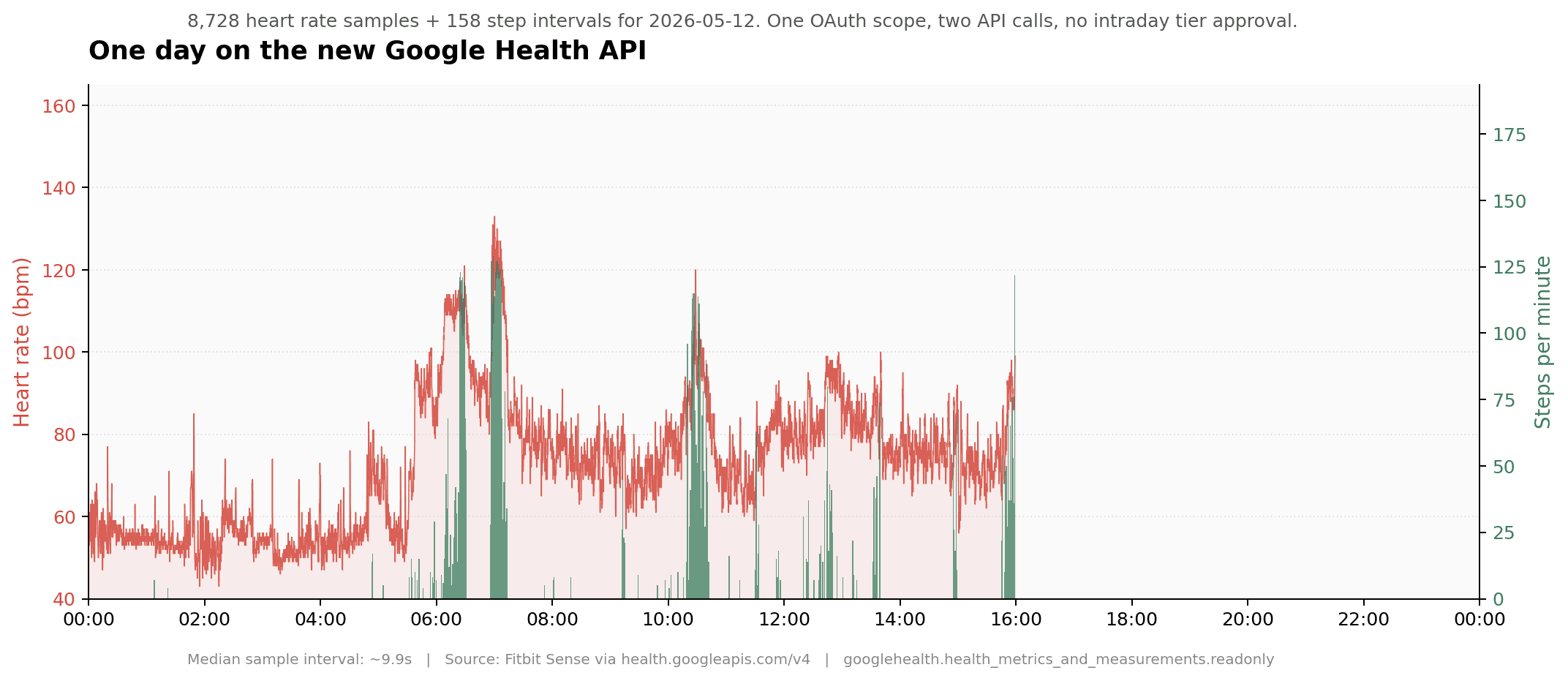
When I ran a one-day query against heart rate, the first page returned 5,000 samples and pagination filled in the rest, totalling 8,728 samples for a single day. Then I looked at the timestamps, the median interval between consecutive samples was five seconds.
On the old Fitbit Web API, anything below daily resolution was called "intraday" and required filing an application via Google's Issue Tracker with a justification. Many non-research apps might have never got access. On the new API, five-second heart rate seems to be the default (so far). For anyone building in continuous monitoring, this changes your data resolution massively.
Figure 2. 8,728 heart rate samples plus 158 step intervals for a single day, pulled with one OAuth scope and two API calls. No intraday tier approval required.
A complete, runnable example
The script (Python, stdlib only) that produced the data behind Figure 2. About thirty lines including pagination:
import json, urllib.request, urllib.parse


TOKEN = "<your access token>"


def fetch(data_type, filter_expr):

    base = f"https://health.googleapis.com/v4/users/me/dataTypes/{data_type}/dataPoints"

    points, page_token = [], None

    while True:

        qs = {"filter": filter_expr, "pageSize": "10000"}

        if page_token:

            qs["pageToken"] = page_token

        req = urllib.request.Request(

            base + "?" + urllib.parse.urlencode(qs),

            headers={"Authorization": f"Bearer {TOKEN}"},

        )

        with urllib.request.urlopen(req) as r:

            body = json.loads(r.read())

        points.extend(body.get("dataPoints", []))

        page_token = body.get("nextPageToken")

        if not page_token:

            break

    return points


hr = fetch("heart-rate",

    'heart_rate.sample_time.physical_time >= "2026-05-12T00:00:00Z" '

    'AND heart_rate.sample_time.physical_time < "2026-05-13T00:00:00Z"')


steps = fetch("steps",

    'steps.interval.start_time >= "2026-05-12T00:00:00Z" '

    'AND steps.interval.start_time < "2026-05-13T00:00:00Z"')


total_steps = sum(int(p["steps"].get("countSum", 0)) for p in steps)


print(f"Heart rate samples: {len(hr)}")          # 8728

print(f"Step intervals:     {len(steps)}")        # 158

print(f"Total steps:        {total_steps}")       # 6801
Google Health API filter syntax: Interval, Sample, Daily, Session
Every data type in the new API has a "kind," and the kind tells you what filter expression to use. There are four kinds:
Interval: events that span a duration. Steps, distance, floors, sedentary periods.
Sample: single point-in-time measurements. Heart rate, weight, body fat.
Daily: one summary per day. Daily resting heart rate, daily HRV.
Session: longer events with metadata. Sleep, exercise.
Each kind has its own filter syntax. For Interval types it's {type}.interval.start_time. For Sample types it's {type}.sample_time.physical_time. For Daily it's {type}.date. For Session it's {type}.interval.end_time. You'll see this in the AIP-160 filter expressions:
filter=steps.interval.start_time >= "2026-05-14T00:00:00Z"

   AND steps.interval.start_time <  "2026-05-15T00:00:00Z"
Google Health API :reconcile method vs :list
The :reconcile method is the one that surprised me most. If a user has data from multiple sources for the same metric (say, both a Fitbit and a Pixel Watch reading their heart rate), the reconcile method returns a single merged stream. You don't have to dedupe across sources yourself, the API does it for you.
Anyone who's tried to merge step counts from a phone and a watch for the same user knows what I mean. Phone-counted steps double-count whenever someone takes their phone for a walk, and watch-counted steps drop when someone leaves their watch on the charger. Reconciling them needs source-priority logic, timestamp deduplication, and sensible fallbacks.
The schema difference between the two methods is exactly what you'd expect once you read the discovery doc. Each :list data point includes a dataSource block (platform, device.displayName, recordingMethod) and a name (resource path). Each :reconcile data point drops the dataSource block (the merge collapsed it) and uses dataPointName instead of name. The wrapper key on both responses is dataPoints. Same data-type-specific payload (heartRate, sleep, etc.) sits inside.
In practice that means: with :list you can render "Pixel Watch said 68 bpm at 10:00:05, Fitbit Sense said 68 bpm at 10:00:10," and you write the dedupe logic. With :reconcile you get a single sequence of heart rate readings without per-point provenance, and Google has done the merge for you. The trade-off is straightforward. If you need to attribute every point to a device, use :list. If you want one clean stream regardless of how many devices contributed, use :reconcile.
Fitbit Web API vs Google Health API: side-by-side response schema for sleep
We ran the same one-night sleep query against both APIs. The data is structurally the same. The shape isn't.
Fitbit Web API, GET /1/user/-/sleep/date/2026-05-12.json (response structure per dev.fitbit.com):
Google Health API, GET /v4/users/me/dataTypes/sleep/dataPoints?filter=sleep.interval.end_time >= "2026-05-12T00:00:00Z" AND sleep.interval.end_time < "2026-05-13T00:00:00Z":
Fitbit's levels.data[] becomes Google's sleep.stages[] and Fitbit's levels.summary becomes Google's sleep.summary.stagesSummary[]. The rolling thirty-day average (thirtyDayAvgMinutes) that Fitbit returned per stage is gone in Google. Stage names changed from lowercase (wake, light, deep, rem) to upper-case enums (AWAKE, LIGHT, DEEP, REM). Fitbit's efficiency, isMainSleep, infoCode, and logId have no Google equivalents. Google adds dataSource provenance and explicit UTC offsets that Fitbit never had. There is no schema bridge.
Google Health API gotchas: OAuth scopes, pagination, missing endpoints
A few practical things that will save you time.
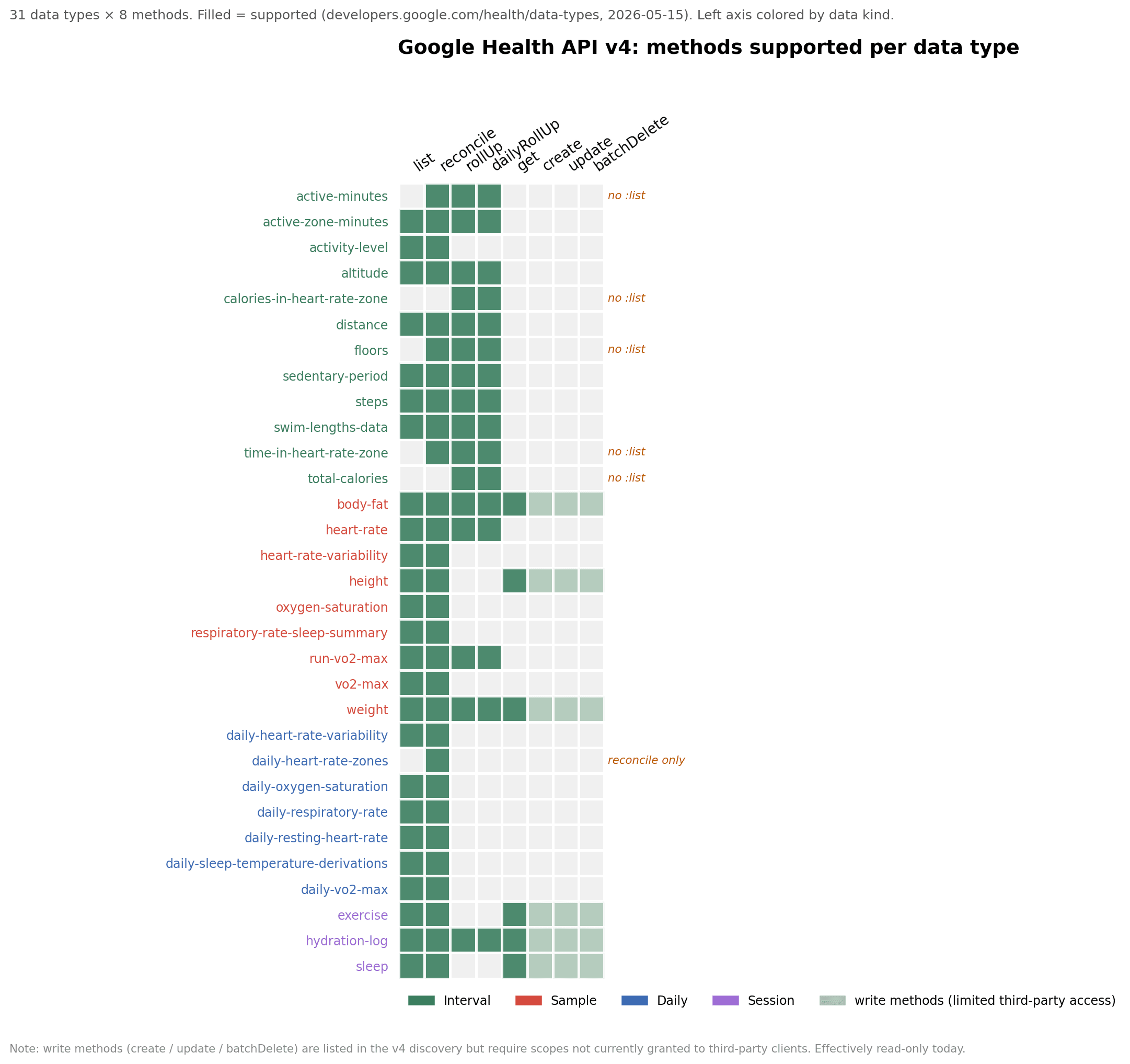
Six data types don't support :list. The methods supported per data type are listed at /health/data-types. The six that only support rollup variants are floors, total-calories, active-minutes, calories-in-heart-rate-zone, time-in-heart-rate-zone, and daily-heart-rate-zones. If you write a naive loop that calls :list on every data type, those six will return a 400 with a perfectly clear error message telling you which methods they do support. Just useful to know up front.
There's no users.dataTypes.list endpoint. You cannot ask the API "which data types does this user have data for." You have to query each type individually. This is a small but real friction for anyone building a "what can I show this user" screen on first login. I'd guess this lands as a future endpoint, but for now plan to probe each type you care about and cache the result.
Token state matters more than it used to. I burned half a day on a 403 error from the data plane (Google's internal name for it is colorful and not very helpful, but the symptom is consistent: profile and identity reads work, data reads fail). The fix in my case was to drop include_granted_scopes=true from the OAuth flow. That parameter is normally a best practice for Google APIs because it unions previously-granted scopes with newly-requested ones, but if your users have previously consented to the legacy Google Fit fitness.* scopes for the same OAuth client, those legacy scopes end up in the token and the new Health API's authorization layer doesn't like the mix. Remove include_granted_scopes. Request only the googlehealth.* scopes you actually need. Skip prompt=consent unless you specifically need it. The clean flow works.
The clean OAuth flow looks like this:
AUTHORIZE_URL = "https://accounts.google.com/o/oauth2/v2/auth"

SCOPES = " ".join([

    "https://www.googleapis.com/auth/googlehealth.activity_and_fitness.readonly",

    "https://www.googleapis.com/auth/googlehealth.health_metrics_and_measurements.readonly",

    "https://www.googleapis.com/auth/googlehealth.sleep.readonly",

    # add others as you need them

])


# Authorization URL: send the user here

auth_params = {

    "client_id":     CLIENT_ID,

    "redirect_uri":  REDIRECT_URI,

    "response_type": "code",

    "scope":         SCOPES,

    "access_type":   "offline",

    # NOTE: do NOT pass include_granted_scopes=true. If your users have ever

    # consented to legacy fitness.* scopes on this OAuth client, those scopes

    # get unioned into the token and the Google Health data plane rejects

    # mixed-scope tokens with an undocumented internal error.

    #

    # NOTE: do NOT pass prompt=consent unless you specifically need it.

}


# Token exchange: POST body, no HTTP Basic

import urllib.parse, urllib.request, json


def exchange_code(code):

    body = urllib.parse.urlencode({

        "grant_type":    "authorization_code",

        "code":          code,

        "redirect_uri":  REDIRECT_URI,

        "client_id":     CLIENT_ID,

        "client_secret": CLIENT_SECRET,

    }).encode()

    req = urllib.request.Request(

        "https://oauth2.googleapis.com/token",

        data=body,

        headers={"Content-Type": "application/x-www-form-urlencoded"},

        method="POST",

    )

    with urllib.request.urlopen(req) as r:

        return json.loads(r.read())  # access_token, refresh_token, scope, expires_in
Some data types are in the API but not in the public reference page. I found three: electrocardiogram (which requires a scope called ecg_readonly that doesn't appear in the public scope list, so it's likely behind a separate approval), blood-glucose, and body-temperature. The latter two return data with the standard health_metrics_and_measurements.readonly scope, despite not being listed at /health/data-types. I'd treat this as a documentation lag rather than a gating decision, and expect them to appear in the docs at some point.
The schema overlap with Fitbit is zero. I did a field-path diff between the old Fitbit API responses and the new Google Health responses for seven overlapping data types (sleep, weight, exercise, HRV, breathing, VO2max, SpO2). There were zero common field paths across all of them. Google nests everything under <data_type>.<field> plus a dataSource wrapper, and Fitbit used to return flat top-level keys. So if you have a parser, an ETL pipeline, or a dashboard that depends on the Fitbit JSON shape, plan to rewrite it.
Here's the full picture of which methods are supported per data type. The six :list exceptions called out above are visible at a glance as the rows missing a filled cell in the first column:
Figure 3. 31 data types × 8 methods. Filled cells indicate supported methods; rows are coloured by data kind. Write methods (create / update / batchDelete) appear in the discovery doc but aren't yet granted to third-party clients.
For copy-paste and search indexability, the same matrix as text:
Data type
Kind
list
reconcile
rollUp
dailyRollUp
get
create
update
batchDelete
active-minutes
Interval
✓
✓
✓
active-zone-minutes
Interval
✓
✓
✓
✓
activity-level
Interval
✓
✓
altitude
Interval
✓
✓
✓
✓
body-fat
Sample
✓
✓
✓
✓
✓
✓
✓
✓
calories-in-heart-rate-zone
Interval
✓
✓
daily-heart-rate-variability
Daily
✓
✓
daily-heart-rate-zones
Daily
✓
daily-oxygen-saturation
Daily
✓
✓
daily-respiratory-rate
Daily
✓
✓
daily-resting-heart-rate
Daily
✓
✓
daily-sleep-temperature-derivations
Daily
✓
✓
daily-vo2-max
Daily
✓
✓
distance
Interval
✓
✓
✓
✓
exercise
Session
✓
✓
✓
✓
✓
✓
floors
Interval
✓
✓
✓
heart-rate
Sample
✓
✓
✓
✓
heart-rate-variability
Sample
✓
✓
height
Sample
✓
✓
✓
✓
✓
✓
hydration-log
Session
✓
✓
✓
✓
✓
✓
✓
✓
oxygen-saturation
Sample
✓
✓
respiratory-rate-sleep-summary
Sample
✓
✓
run-vo2-max
Sample
✓
✓
✓
✓
sedentary-period
Interval
✓
✓
✓
✓
sleep
Session
✓
✓
✓
✓
✓
✓
steps
Interval
✓
✓
✓
✓
swim-lengths-data
Interval
✓
✓
✓
✓
time-in-heart-rate-zone
Interval
✓
✓
✓
total-calories
Interval
✓
✓
vo2-max
Sample
✓
✓
weight
Sample
✓
✓
✓
✓
✓
✓
✓
✓
Google Health API roadmap: write access, nutrition, missing data types
A few things are conspicuously missing from v4 today and will probably show up later:
Write access. The discovery doc shows create, patch, and batchDelete methods on dataPoints, but no googlehealth.* scope I've seen actually grants write to third-party clients. I'd expect Google to add write scopes per data category before September, especially for the data types where logging is the whole point (nutrition, hydration, manual weight entries).
Nutrition / food log. The googlehealth.nutrition.readonly scope is offered in OAuth grants but no nutrition data type ID is currently accepted. Likely reserved for a future endpoint.
Some Fitbit-specific data types. Blood pressure, menstruation, irregular rhythm notifications, core and skin temperature, the devices endpoint, and the social features have no equivalent today yet. Some may land before September, some may not. If your integration depends on these, this is the thing to ask Google about directly.
The point is: this is an API that's clearly being built in public and shipped continuously. The release notes already show six months of additions between March and now. Don't treat what's there today as final, as things are
Google Health API migration playbook for Fitbit developers
Loose playbook based on what I've seen:
Now through end of May: stand up a parallel integration. Don't try to swap your existing Fitbit Web API code over in one move. Add a second code path that talks to health.googleapis.com/v4/. Run them side by side. The architectures are different enough that you'll want to keep the Fitbit code working until you've validated the new path against real user data.
Test with your own account first. The identity endpoint at users/me/identity returns both legacyUserId (your old Fitbit user ID) and healthUserId (the new Google one). Use this to confirm linkage before you trust any other reads.
Plan for the reconsent. Every existing user has to go through OAuth again because tokens don't transfer. Build the UX before you build the code. A dismissible banner that becomes a modal that becomes mandatory, across about three months, is the right shape.
Rewrite the parser, not the schema mapping. I tried briefly to write a translation layer that mapped Google Health responses back into the Fitbit JSON shape, so my downstream code wouldn't have to change. After about an hour I abandoned it, the structures are too different, and you'll end up with a leaky abstraction that fails on the new fields. Just write a new parser because that’s faster.
Get on the Restricted-scope review path early. All googlehealth.* scopes are classified Restricted, which means production access requires Google's privacy and security review. The review has no published SLA. Start it as soon as your Cloud project is set up, and don't let this be the thing that's blocking you in August.
What the Google Health API tells us about the future roadmap
The shape of an API tells you what the people who built it think their product is for. Looking at this one:
Single uniform resource shape suggests they expect more data types to land over time, and they want adding one to be cheap.
Source-tagging on every data point suggests they expect more devices than just Fitbit to feed this store. Pixel Watch is the obvious one. Third-party devices via Health Connect on Android are another.
Reconciled streams suggest they expect users to have multiple devices simultaneously, which they increasingly do.
Project-level webhooks instead of user-level subscriptions suggest they're thinking about B2B integrations as the primary case, not consumer apps.
Restricted scope review suggests they want fewer, more accountable partners on the platform.
Open questions about the Google Health API
Some open questions I haven't been able to answer from the docs alone, that I'd love to hear from anyone who has:
What's the actual rate limit?
What's the SLA on Restricted-scope review for a typical app?
For users with multi-year Fitbit histories, does the new API serve their pre-2026 data, or is there a horizon? My test account is too new to tell.
What's the roadmap for write access and for the data types currently missing?
Will the ecg_readonly scope be available to non-clinical apps?